Topics & collaboration
Notifications & following: stay in the loop
Not every contact matters equally. With the follow feature you decide which contacts to stay up to date on — and how often Company Contacts informs you.
Following a contact
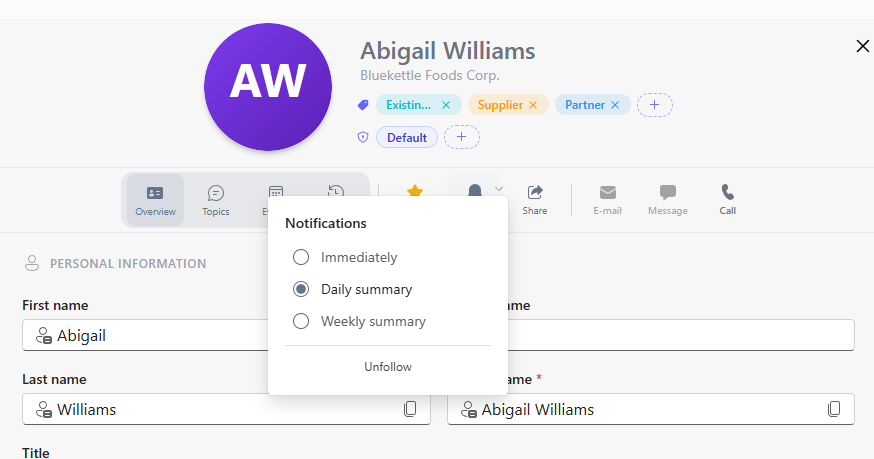
- Open the contact and enable "Follow".
- Choose the notification frequency:
| Frequency | Suited for |
|---|---|
| Instant | Key accounts and ongoing negotiations — every activity counts |
| Daily | Important contacts where one digest per day is enough |
| Weekly | Contacts you want to keep an eye on without being interrupted |
What you are informed about
- New topics and comments on contacts you follow
- @-mentions — when colleagues address you directly
- Assignments — when a topic is assigned to you
- Changes to the contact data of followed contacts
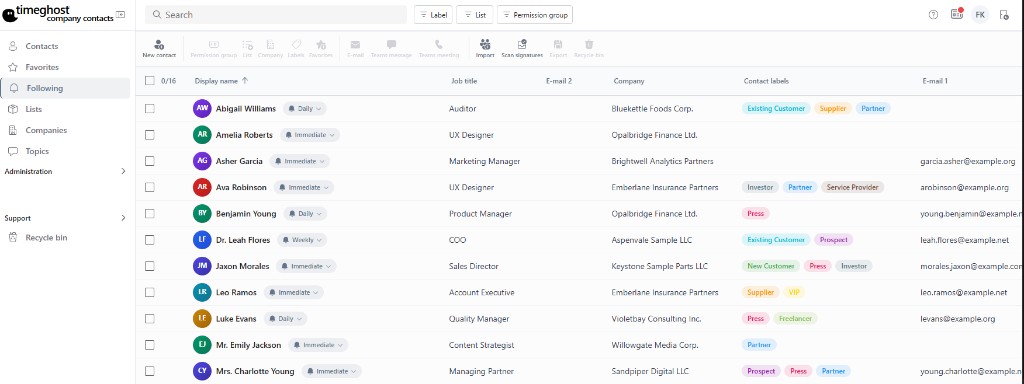
The Following area shows all contacts you follow — including the frequency set per contact:
Recommendations
- Follow the contacts you are responsible for with instant notifications.
- Use the weekly digest for existing customers without pressing issues.
- Combine following with favorites: favorites for quick access, following for staying informed.
Frequently asked questions
When do I get notified?
You are notified when you are mentioned in a topic or comment, when a topic is assigned to you, or when there is activity on contacts you follow.
Can I set the notification frequency?
Yes. Per contact you choose between instant notification on every activity, a daily digest or a weekly digest.
What is the difference between following and favorites?
Following controls notifications: you are informed about activity on the contact. Favorites are a personal quick access in the contact list. Both can be combined.