Contacts & companies
Managing companies: organizations, industries, assignment
Besides individual people, Company Contacts also manages the organizations behind them. Companies bundle all contacts of an organization and add master data such as industry, address and time zone.
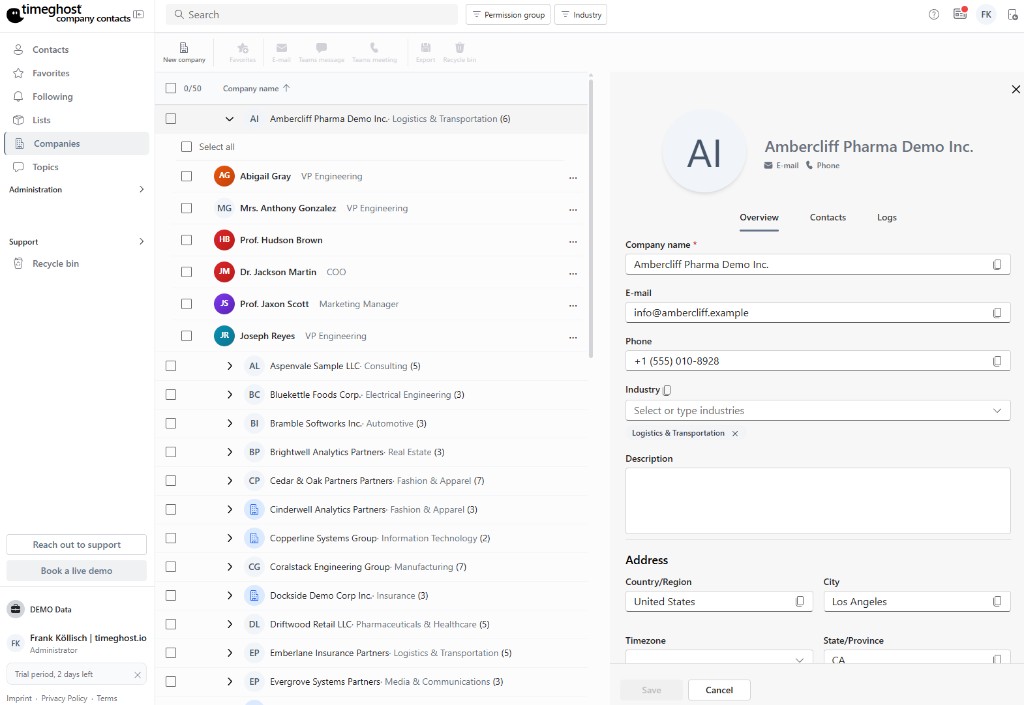
Creating a company
- Switch to the Companies area and click "New company".
- Enter the company name and add the master data:
- Industry — for categorization and filtering
- Address — headquarters or relevant locations
- Time zone — shows what time it currently is at your business partner
- Website and social media — LinkedIn, X and other profiles
Assigning contacts
Assign contacts to a company in the organization section of the contact detail view. On the company page you then see all people of the organization at a glance — including position and contact details.
Companies in everyday work
- Filtering: Find all contacts of a company or industry in seconds.
- Context: When opening a contact you immediately see which organization they belong to.
- Topics: Topics on a company's contacts give you an overview of what your team is currently working on with that organization.
Frequently asked questions
How do I assign a contact to a company?
Open the contact and select the company in the organization section — or create it right there. The contact then appears in the company's list of people.
What is the company time zone good for?
The stored time zone shows you at a glance what time it currently is at your business partner — handy for international teams to schedule calls and meetings appropriately.
Can companies also be created via import?
Yes. During CSV import, company names are taken from the contact data. Companies are also created automatically when signature scanning detects new people with company details.