Contacts & companies
Custom fields & tags: structure contacts your way
Every team has its own requirements for contact data. With custom fields and tags you adapt Company Contacts to the way you work — from customer numbers to lead categories.
Custom fields
Custom fields extend every contact with exactly the information your team needs. Four field types are available:
| Type | Example |
|---|---|
| Select | Lead status: new, qualified, customer |
| Text | Customer number, internal note |
| Number | Revenue potential, employee count |
| Date | Contract end, last visit |
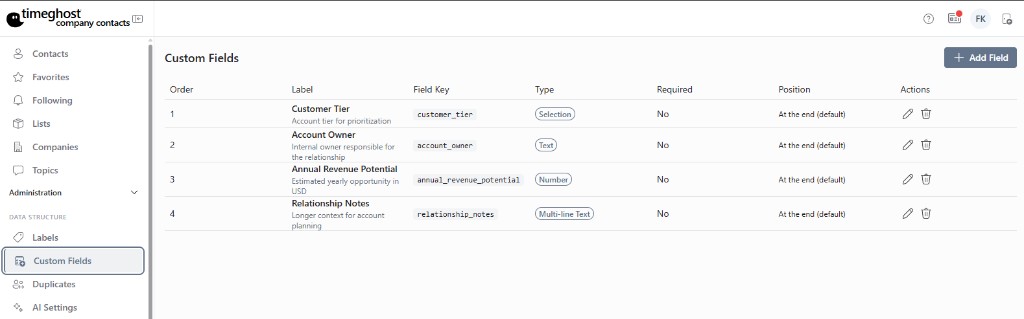
Creating a field
- Open Administration and go to custom fields.
- Create a new field: name, field type and — for select fields — the options.
- The field then appears in the overview of every contact and can be filled in there.
Tags
Tags are flexible labels for categorizing and filtering. Company Contacts distinguishes two kinds:
- Contact tags — categorize contacts, e.g. "customer", "supplier", "partner" or "trade fair 2026"
- Topic tags — categorize topics, e.g. "quote", "support" or "follow-up"
Assign tags directly on the contact or topic. You can then filter by them in the contact list and on the topic board.
Recommendations from practice
- Keep the number of tags manageable — a few clearly defined tags filter better than many similar ones.
- Use select fields instead of free text when values should stay comparable.
- Combine tags with lists: lists for fixed groups, tags for properties.
Frequently asked questions
Which field types are available for custom fields?
Company Contacts supports four field types: select (predefined options), text, number and date. This lets you model customer numbers, contract dates or lead status, for example.
What is the difference between contact tags and topic tags?
Contact tags categorize contacts (for example customer, supplier, partner), topic tags categorize themes on the topic board (for example quote, support, follow-up). Both tag types are managed separately.
Who is allowed to create custom fields?
Custom fields are managed centrally in administration so the structure stays consistent across the team. Any team member with edit rights can fill in the fields.