Contacts & companies
Favorites & lists: group contacts and find them fast
The bigger the shared address book, the more important structure becomes. Favorites and lists help you find important contacts quickly and bundle groups for projects or campaigns.
Favorites
Mark important contacts as favorites with one click on the star icon. Your favorites:
- appear in a dedicated filter of the contact list,
- are your personal selection — every team member has their own favorites,
- are ideal for the contacts you work with daily.
Lists
Lists bundle contacts into named groups that are available to the whole team — for example "Website relaunch project", "Trade fair contacts 2026" or "Newsletter recipients".
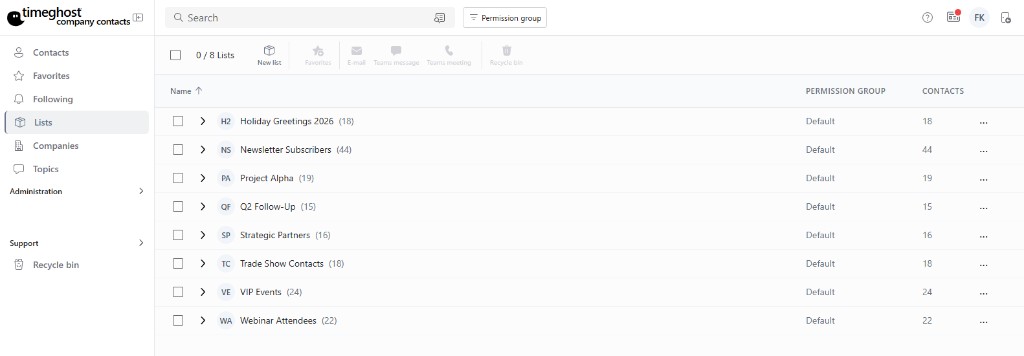
Creating and filling a list
- Create a new list with a descriptive name in the Lists area.
- Assign contacts to the list — directly on the contact or from the contact list.
- A contact can be in any number of lists at the same time.
Working with lists
- Filter the contact list by a list to see only the relevant group.
- Use lists as the basis for a CSV export of individual groups.
- Combine lists with tags: lists for fixed groups, tags for properties.
Frequently asked questions
Are favorites visible to the whole team?
Favorites are your personal selection for quick access. Lists, on the other hand, are available to the team and are suited for shared projects or campaigns.
Can a contact be in multiple lists?
Yes. A contact can be assigned to any number of lists — for example the project list and the newsletter list at the same time.
When should I use lists and when tags?
Lists are best for fixed groups such as project or campaign contacts. Tags describe properties such as "customer" or "supplier". In practice, combining both works best.